NeuronWriter Review: a realistic AI SEO workflow that doesn’t turn your content into “SEO mush”
 Steven Doan


If you’re searching for a NeuronWriter review because you want faster briefs, clearer on-page priorities, and less “guessing” when optimizing content—this is the tool I’d put in the “useful, not magical” bucket. It can genuinely speed up content planning and refresh work, but you still need taste, editing, and a point of view.
Quick action
Want the full product overview + best use cases + internal links to comparisons and workflows? Start here: NeuronWriter Product Page.
Note: prices/features change often. Treat any pricing in this review as directional and verify on the official checkout page.
What NeuronWriter is (and what it isn’t)
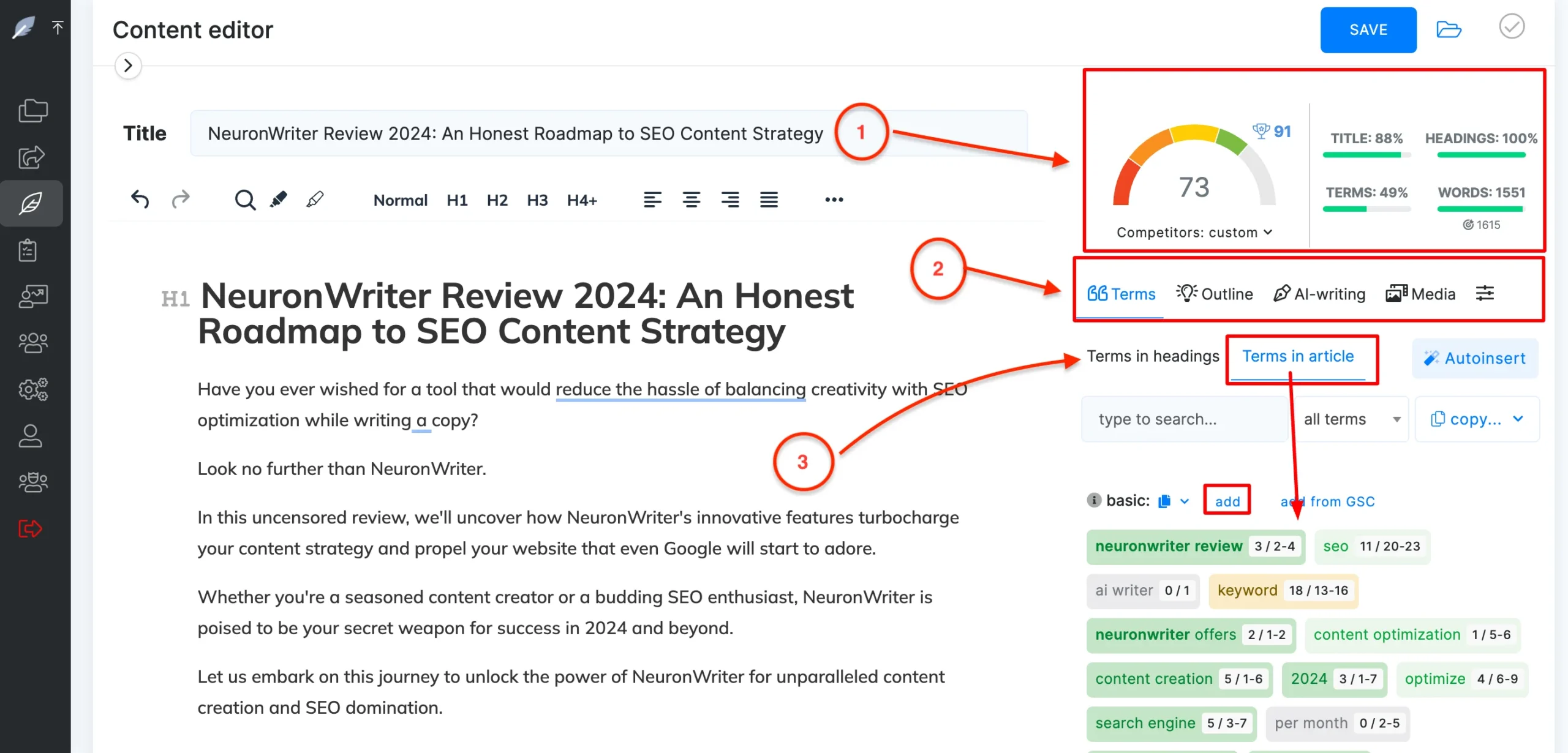
In plain terms, NeuronWriter sits in the “AI-assisted SEO content optimization” category. Think: topic coverage guidance, outline/brief support, and content improvement signals based on what’s ranking. It’s not just “write me an article” (even if it can generate text). It’s more like a structured assistant that helps you answer: “What should this page include to compete?”
NeuronWriter is:
- A workflow tool to plan and optimize content around a query/topic.
- A way to standardize briefs for yourself or writers.
- A “don’t forget the basics” checklist for on-page coverage.
NeuronWriter isn’t:
- A guarantee that your page will rank.
- A replacement for expertise, experience, or real examples.
- A substitute for strong information architecture (you still need hubs/silos like /ai-seo-tools/).
If your mental model is “I’ll buy this and the rankings will come,” you’ll be disappointed. If your mental model is “I want a reliable process so I can publish more good pages with fewer misses,” you’re closer to the truth.
What’s inside this NeuronWriter review
Here’s a quiet frustration most writers don’t say out loud: you can write a perfectly decent post—and still lose to pages that aren’t better written. They’re just more complete. They anticipate the follow-up questions. They define the terms earlier. They include the comparisons you assumed the reader already knew.
That’s the real job of a SERP-driven optimizer: not to “make you rank,” but to reduce the blind spots between your draft and what searchers actually expect for that query.
This NeuronWriter review is a practical look at how the tool works in a real content workflow: SERP analysis → coverage suggestions → content editor → publish-ready revisions. You’ll also see where NeuronWriter fits (and where it doesn’t), how it compares to popular alternatives like Surfer’s Content Editor, and how to make a clean decision using the trial, pricing, and lifetime deal options.
Skip to what you need
- NeuronWriter pricing (plans, trial, refund)
- NeuronWriter lifetime deal (tiers + break-even thinking)
- NeuronWriter free trial guide (7-day test plan)
- NeuronWriter integrations (WordPress, GSC, Shopify, Zapier)
NeuronWriter review: a quick walkthrough to see the editor workflow before diving into details.
NeuronWriter review summary (best for / not for)
NeuronWriter is a semantic SEO content optimizer that helps you build and refine pages based on what’s currently ranking. The “win” is not the score—it’s a more predictable workflow: fewer missed subtopics, fewer late-stage rewrites, and fewer moments where you publish and immediately realize the page lacks the obvious sections the SERP expects.
Best for
- Bloggers and niche site builders who publish consistently and want a repeatable “coverage sanity-check.”
- Small SEO teams that need a shared editor workflow (analyze → outline → optimize) that writers can follow without living inside SEO tooling.
- Agencies that need a scalable way to standardize on-page coverage and hand off drafts cleanly.
- Anyone who writes well but still misses SERP-required sub-questions (because time and attention are finite).
Not a great fit (or use cautiously)
- You want a full SEO suite for audits, link research, and deep technical SEO. NeuronWriter is content-focused.
- You rarely publish. Any optimizer becomes shelfware if it’s not part of a weekly routine.
- You chase a perfect score as if it guarantees rankings. That habit can produce bloated, mechanical content.
If you’re deciding quickly: read this review for workflow fit, then verify plan gating on NeuronWriter pricing, and run one real keyword through the trial plan in the 7-day guide.
How NeuronWriter works (SERP → terms → editor)
NeuronWriter follows a straightforward loop. What matters is how you use it:
- Create a query (the keyword/topic you want to target).
- Review competitor coverage (what top pages consistently include).
- Build a structure (outline + headings based on what the SERP expects).
- Write/revise in the editor using coverage suggestions as prompts for clarity.
- Publish and repeat the workflow consistently.
This sounds obvious until you remember what most people actually do: write first, then “optimize” in a panic when the post doesn’t perform. NeuronWriter nudges you to flip that sequence—SERP patterns first, drafting second, optimization as a guided revision pass.
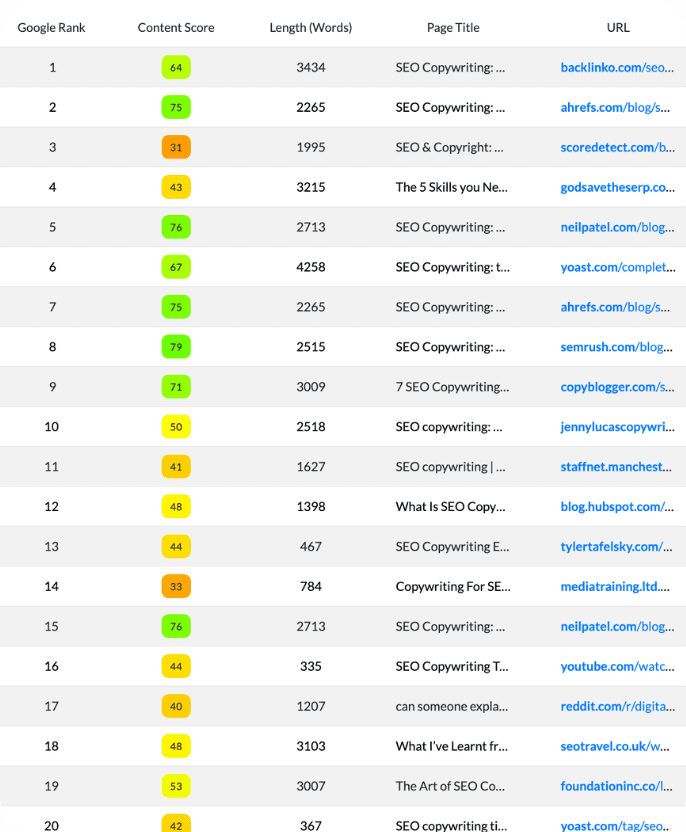
The big idea is semantic coverage. Not “add the keyword more times,” but “answer the set of questions and concepts that reliably appear in top results.” When you do that well, you’re not writing for the tool—you’re writing something that feels more complete to the reader.
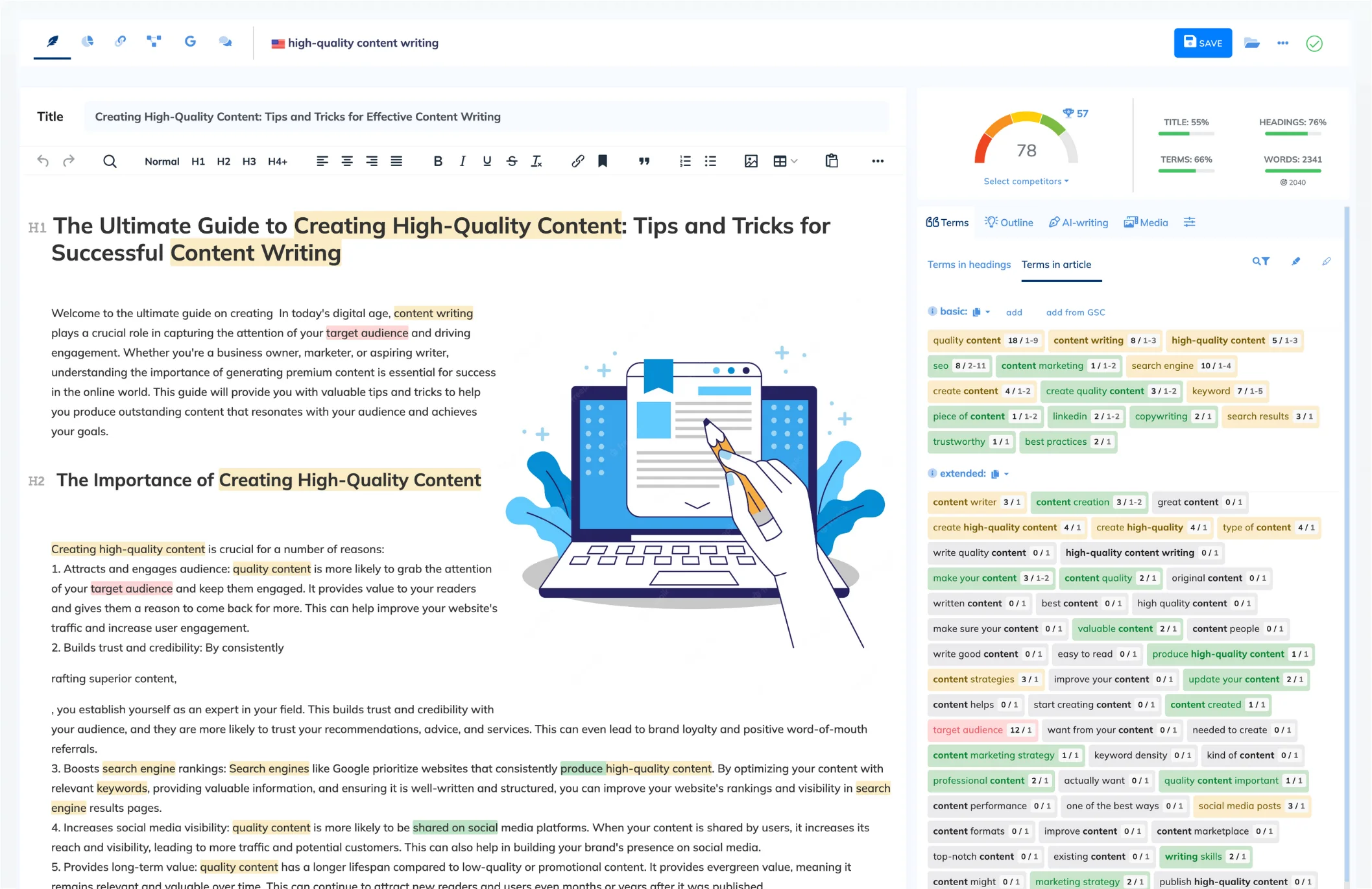
Inside the NeuronWriter content editor (what actually matters)
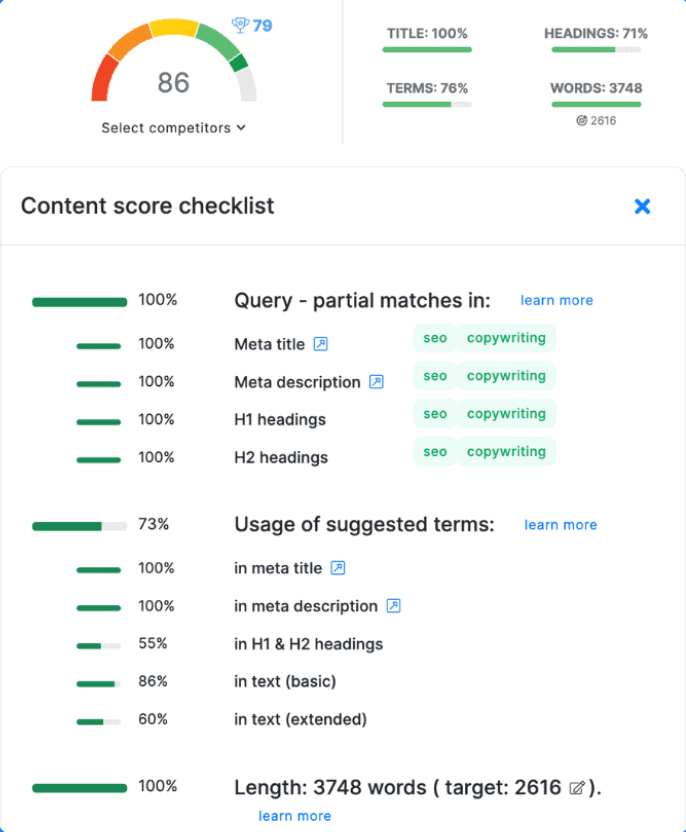
The NeuronWriter content editor is where the tool either becomes a time-saver—or an annoying scoreboard. Used well, it behaves like a checklist for relevance and completeness:
- Structure visibility: headings and section flow are easier to audit.
- Coverage suggestions: terms/entities are cues for subtopics you may need to explain.
- Revision guidance: you can prioritize what to fix instead of making random edits.

The “score trap” (and how to avoid it)
Every optimizer has this problem: once you can measure something, you start optimizing for the measurement. If your goal becomes “hit 90+,” you’ll add paragraphs that exist for the tool, not the reader.
A better rule: only add a suggested concept if it improves understanding. If it can’t be explained naturally in your voice, it probably doesn’t belong in the page—or it belongs in a smaller section, a definition box, or an FAQ, not as more filler paragraphs.
If you’re the person who keeps content honest, this is where NeuronWriter can help: you can push back with specifics. Instead of “this feels thin,” you can say “we’re missing definitions, comparison criteria, and the ‘how it works’ section competitors consistently include.” That kind of feedback scales across teams.
What surprised me (and what didn’t)
Nothing in NeuronWriter is magic. That’s good news. It means you can evaluate it like a workflow tool instead of a lottery ticket.
What surprised me
- It’s easy to keep the workflow light. Some tools feel like a cockpit. NeuronWriter still has depth, but the core loop remains approachable.
- It helps writers shift from “adding keywords” to “building answers.” When you treat suggestions as prompts for explanation, content becomes clearer, not more robotic.
- The editor can work as a team standard. Even if your writers differ in skill, a shared checklist reduces the “why didn’t we include this?” edit cycle.
What didn’t surprise me
- You still need judgment. SERP patterns can reflect real user needs—or copycat behavior. The tool can’t know what’s irrelevant for your audience.
- AI drafting is not a finish line. Draft accelerators still need human editing for logic, credibility, and tone.

NeuronWriter integrations (where it saves real time)
Integrations matter when you’re tired of the “last mile” problem: the post is done, but publishing and workflow handoff still takes longer than it should.
NeuronWriter integrations are designed to reduce that friction—especially if you publish into WordPress or want to use Search Console data to prioritize what to optimize. If you’re doing client work, the time saved is less about “one-click publish” and more about fewer manual steps and fewer things to forget.
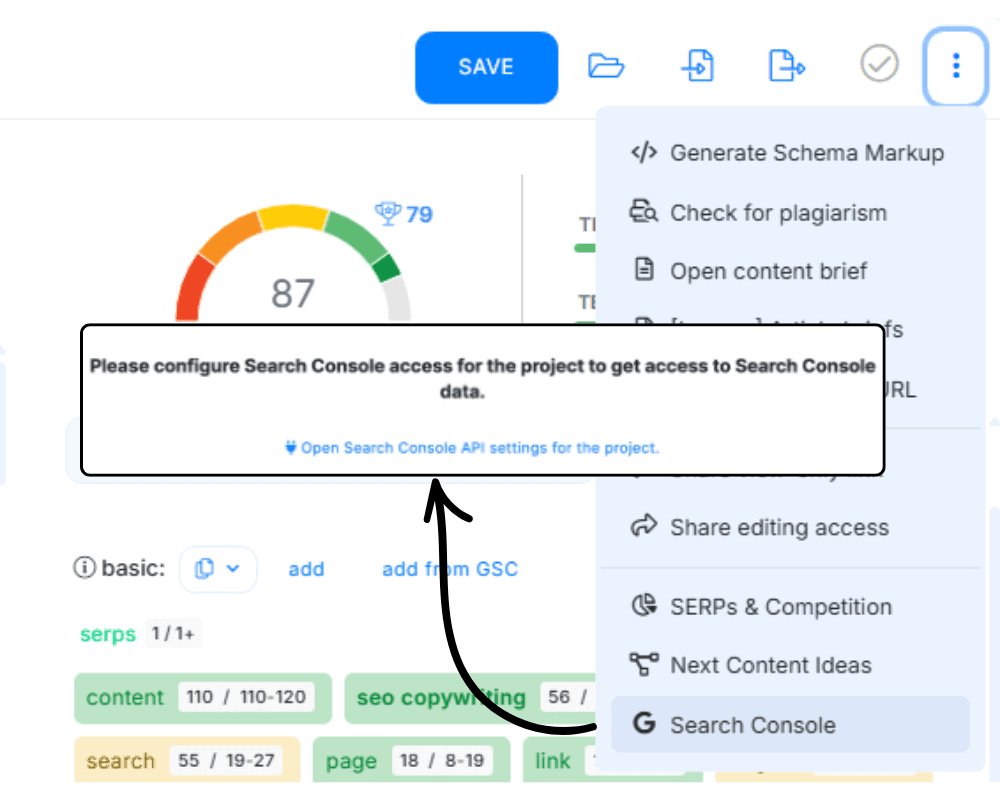
If integrations are a deciding factor, don’t rely on assumptions. Read the dedicated setup paths here: NeuronWriter integrations.
Common mistakes that make NeuronWriter feel “robotic”
NeuronWriter review: a longer tutorial if you want to see the full workflow end-to-end. Source: Youtube
- Stuffing terms to satisfy the editor: if a term doesn’t improve understanding, don’t force it in.
- Overbuilding the outline: more headings don’t equal more value. Combine sections when the reader doesn’t need separation.
- Letting AI drafts stand unedited: treat AI as a starting point; rewrite for clarity, credibility, and your audience’s context.
- Ignoring intent: the SERP may demand comparisons, pricing logic, use cases, or step-by-step guidance. Don’t dodge those sections.
If you want a deeper method for using suggestions without stuffing, the workflow article is worth reading: NeuronWriter semantic SEO workflow.
My practical NeuronWriter workflow (how I’d actually use it)
I’ve built enough affiliate content to learn the hard way: speed matters, but consistency matters more. The reason AI SEO tools are tempting is you want to stop reinventing the wheel for every article. Here’s the workflow I recommend if you want NeuronWriter to help—not hijack—your writing.
Step 1: Start with intent and “job to be done” (before any score)
Before you chase terms or headings, write one sentence: “The reader is trying to ____ and I will help them by ____.” This prevents you from writing an “SEO-shaped” article that doesn’t satisfy the reader.
Step 2: Build a brief that matches your site structure (hub → pillar → subpages)
For Affibest-style architecture, I’d align briefs like this:
- Category hub: /ai-seo-tools/ (topical authority)
- Product pillar: /neuronwriter/ (entity core + CTA)
- Subpages: /neuronwriter/review, /coupon, /workflow, /vs-surfer, /vs-frase
NeuronWriter can help keep each page honest: the hub should be broad and navigational, the pillar should be buyer-oriented, and the review should be evidence-driven and realistic.
Step 3: Draft with “coverage” in mind, then edit for voice

Drafting with coverage means you ensure you’ve addressed key angles (features, use cases, limitations, alternatives). Editing for voice means you remove generic filler, add examples, and make decisions (what’s good, what’s not). If you only do the first part, your content will feel like every other AI-assisted article online.
Step 4: Optimize last (and stop at “good enough”)
The mistake I see constantly: people keep writing until the tool is happy. The smarter move: get to “competitive coverage,” then stop and improve clarity, examples, and internal linking. In practice, internal link architecture often moves the needle more than squeezing an extra “optimization point.”
Want a copy/paste implementation workflow?
Use the dedicated guide page: /neuronwriter/workflow (best for: content refresh + briefs + publishing rhythm).
Pros and cons (the “gotchas” nobody wants to admit)
What I like
- Repeatable workflow: helps you publish consistently without guessing structure every time.
- Briefing speed: reduces time-to-outline and helps you delegate writing more cleanly.
- Refresh friendly: good for upgrading existing posts (often the quickest win).
- Coverage guardrails: reduces the chance you forget obvious subtopics.
What I don’t like
- Score obsession risk: can push you into writing for the tool instead of the reader.
- Generic AI text temptation: if you copy-paste drafts, your content becomes interchangeable.
- Requires taste: you must decide what to ignore, or you’ll bloat the article.
- Not a strategy: without hubs/silos + internal links, it can’t “fix” architecture problems.
The truth: tools don’t replace positioning
I’ll be blunt: the sites winning long-term aren’t just “optimized.” They’re recognizable. They have a point of view. A tool can help you ship, but you still need editorial standards and a clear structure: category hub → product pillar → product subpages.
NeuronWriter vs Surfer vs Frase: where it fits
You’ll often see NeuronWriter compared with Surfer and Frase because they live in the same ecosystem: optimization guidance + content workflows. The “right” choice depends less on features and more on your publishing system.
My simple way to choose
- If you want strict optimization frameworks: you may lean Surfer-style workflows.
- If you want research/briefing with flexible writing: Frase-style workflows can feel natural.
- If you want a repeatable affiliate-friendly workflow: NeuronWriter can be a solid middle path—if you keep your voice.
NeuronWriter tends to fit if you want:
- A guided editor workflow that’s clear and repeatable for writers.
- Semantic coverage prompts (terms/entities) to reduce missed subtopics.
- A lower-friction tool you’ll actually open frequently.
For deep comparisons, use the dedicated pages: NeuronWriter vs Surfer and NeuronWriter vs Frase. Those pages should focus on specific use cases (content refresh, briefs, team workflows, and cost-per-output), not just feature lists.
For many buyers, the decision ends up being cost + habit: which tool will you still use after the first two weeks of excitement fade?
Who should buy NeuronWriter (and who shouldn’t)
You should consider NeuronWriter if:
- You publish consistently and need a system for briefs + structure.
- You’re building an affiliate/content site and want repeatable optimization without overthinking.
- You refresh old content regularly and want a checklist to upgrade posts efficiently.
- You can edit aggressively and won’t let a score dictate your voice.
You should skip (or delay) if:
- You don’t publish enough for workflow tools to pay off.
- You want “one-click ranking content.” That’s not how this works.
- Your brand requires highly original editorial voice and you don’t have time to edit.
- You haven’t built the basics: topical hubs, internal links, and consistent content cadence.
My practical advice: if you’re early-stage, invest first in architecture and publishing rhythm. Once you’re shipping weekly, tools like this become leverage.
or many buyers, the decision ends up being cost + habit: which tool will you still use after the first two weeks of excitement fade?
Pricing + lifetime deal (quick take)
NeuronWriter pricing only becomes “expensive” if you don’t use it. If you publish regularly—or refresh older posts—the value is in fewer rewrites and clearer coverage decisions.
Use the trial like a workflow test
NeuronWriter offers a 7-day free trial for new users (aligned with Gold plan features). The trial allows a limited number of analyses, so it’s best used with focus: one real keyword, one real draft, one decision.
If you want a structured checklist, use: NeuronWriter free trial guide.
When the NeuronWriter lifetime deal makes sense
The NeuronWriter lifetime deal tends to make sense when you already know you’ll keep publishing and optimizing content long-term. It removes monthly billing friction, but it only “wins” if you truly use the workflow consistently.
Go deeper here:
- NeuronWriter pricing (plan gating, trial, refund)
- NeuronWriter lifetime deal (tiers + what resets monthly)
See NeuronWriter pricing Compare the lifetime deal Go to NeuronWriter
NeuronWriter review FAQ
Does NeuronWriter replace a human writer?
No. It can speed up outlining, coverage checks, and first drafts, but a human still needs to add examples, judgment, and clarity. If you want the content to feel trustworthy, you’ll edit heavily.
Is NeuronWriter good for affiliate sites?
Yes—especially if you’re building a structured funnel: category hub → product pillar → subpages like review and coupon. That architecture makes optimization tools more effective because your internal link intent is clear.
Can NeuronWriter help refresh old content?
That’s one of the best use cases. Refreshing posts that already have impressions is often a faster ROI than publishing new posts. Use it to identify missing subtopics, tighten headings, and improve structure—then update internal links to your pillar page.
Will NeuronWriter guarantee rankings?
No tool can guarantee rankings. Rankings depend on competition, links, content quality, and site-wide trust signals. What NeuronWriter can do is reduce avoidable on-page mistakes and give you a repeatable workflow.
Final verdict: should you buy NeuronWriter?
If you consistently publish and your biggest pain is “my posts are good, but they still miss the SERP’s obvious expectations,” NeuronWriter is a strong fit. It turns SERP patterns into a repeatable editor workflow—especially helpful when multiple people touch content.
This NeuronWriter review boils down to one sentence: NeuronWriter is a practical workflow tool that helps you ship better-structured SEO content faster—if you don’t let the score write for you.
If you’re building Affibest-style silos, it fits neatly: the pillar page (/store/neuronwriter/) captures buyer intent and directs users, while subpages like this review capture deeper intent and push authority back to the pillar.
If you want to decide fast without guessing, do it in this order:
- Confirm plan gating on NeuronWriter pricing.
- Run one real keyword through the 7-day trial plan.
- If you’re publishing long-term, compare subscription vs the NeuronWriter lifetime deal.