
 admin
admin 
Day 1 of a trial is easy. Everything looks promising. The UI feels like a shortcut. You can already picture yourself publishing twice a week like a calmer, more organized person.
Day 3 is where the truth shows up. You realize the tool isn’t the work—you are. The tool just reveals what you’ve been avoiding: competitor patterns, missing sections, vague intent, weak definitions, and that uncomfortable “this post is fine… but it’s not complete.”
By Day 7, you don’t need more excitement. You need clarity. This guide is a practical NeuronWriter free trial plan designed to end with a decision—not a feeling. You’ll run a small number of real analyses, draft (or refresh) one real post, optimize it without keyword stuffing, and decide whether NeuronWriter belongs in your weekly workflow.
NeuronWriter free trial: watch the 3-minute demo first so your 7-day trial time goes into real work, not menu wandering.
If you want to jump ahead
- NeuronWriter review (fit vs not-fit)
- NeuronWriter pricing (plans + trial + refund)
- NeuronWriter lifetime deal (tiers + break-even thinking)
- NeuronWriter semantic SEO workflow (use terms naturally)
NeuronWriter free trial basics (what you get)
Before you plan your week, you need two guardrails:
- The NeuronWriter free trial is 7 days for new users.
- The trial includes Gold plan features, but the trial period allows you to run a limited number of analyses (so you can’t just “test everything on everything”).
That limitation is good. It forces focus. The most common trial failure is trying to test ten things lightly instead of testing one thing deeply. NeuronWriter is not a toy. It’s a workflow tool. Your goal is to prove one of two outcomes:
- Yes: this editor + SERP workflow makes my content more complete, and I’d repeat it weekly.
- No: this doesn’t fit the way I write/publish, or it adds more friction than it removes.
If you’re new to content optimization tools, it helps to keep the concept simple: NeuronWriter is not asking you to “stuff keywords.” It’s asking you to cover the set of concepts and questions the SERP repeatedly rewards for a query. That’s part of modern search engine optimization, but it’s also basic reader empathy: anticipate what people will ask next.
One more practical note: keep your expectations grounded. A 7-day trial will not prove “rankings.” It will prove something more useful: whether NeuronWriter reliably improves your drafts and reduces rework.
The 7-day NeuronWriter free trial plan
This plan is built around a single deliverable: one publish-ready piece (new post or refreshed post). If you follow it, you’ll finish the week with evidence, not guesses.
Before Day 1: pick the right test page (15 minutes)
Choose a topic that meets these criteria:
- It matters to you. You’ll care enough to finish the draft.
- It has real SERP competition. Not a random long-tail you’ll never target again.
- You can improve it. Either you’re writing a new post, or you have an existing post that feels “thin.”
If you already have Google Search Console set up, use it to pick a page that’s close: impressions are there, clicks are low, or the page sits on page 2. If you don’t have GSC yet, the Google Search Console getting started guide is worth bookmarking. It’s not a NeuronWriter feature, but it’s how you stop optimizing blindly.
Day 1: SERP reality check (analysis #1)
Today is not “writing day.” Today is “stop guessing day.”
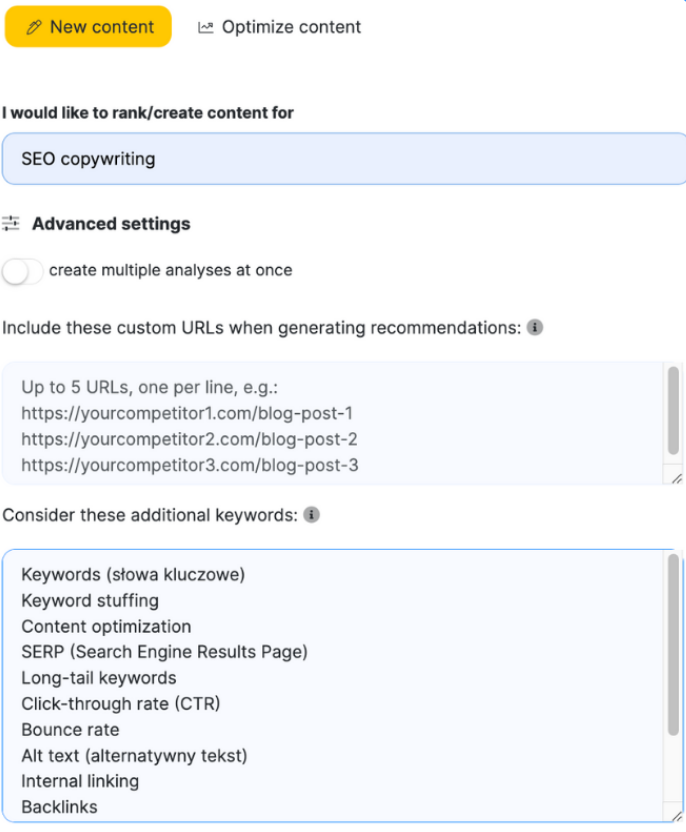
- Create your query inside NeuronWriter.
- Run your first analysis.
- Scan the competitor table and write down:
- The 5–8 headings/subtopics that appear across top results.
- Any “definition” sections you skipped (what is X, how does X work, who is X for).
- Any comparison intent you ignored (X vs Y, best tools, pros/cons, pricing).
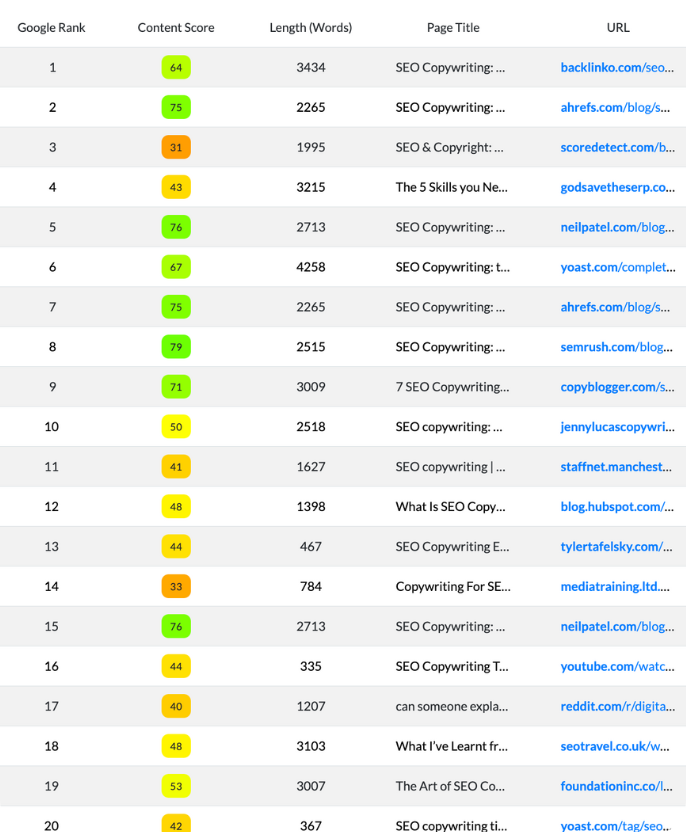
Output of Day 1: a short outline draft (headings only) that matches SERP expectations without copying competitor structure. You’re not trying to clone. You’re trying to cover the same questions in your own voice.
Day 2: build the outline like you mean it
Most outlines fail because they’re too abstract. NeuronWriter suggestions can help you turn vague headings into real sections.
Take your Day 1 headings and add one line under each:
- What is the point of this section?
- What question does it answer?
- What example will make it feel concrete?
Then decide what you will not include. This matters more than you think. A clean page usually outranks a bloated one over time because it’s easier to read, easier to maintain, and easier to trust.

Day 3: draft day (the “confusion day”)
This is the day most people decide a tool “isn’t for them,” and it’s usually because they try to do two conflicting things:
- Write a clean, human page.
- Also satisfy every suggested term like it’s a checklist of obligations.
Don’t do that. Draft like a human. Use suggestions as prompts for clarity, not as mandatory insertions. If NeuronWriter suggests a term and you can’t explain it naturally, one of two things is true:
- Your outline needs a better definition section, or
- The term isn’t necessary for your audience and can be skipped.
Output of Day 3: a full draft (ugly is fine). Your job today is to get the page on its feet.
Day 4: optimization pass (analysis #2)
Now you use NeuronWriter the way it’s meant to be used: as a guided revision assistant.
- Run your second analysis on the draft.
- Review missing concepts and prioritize only the ones that improve understanding.
- Fix the high-impact gaps first: definitions, comparisons, steps, examples, FAQs.
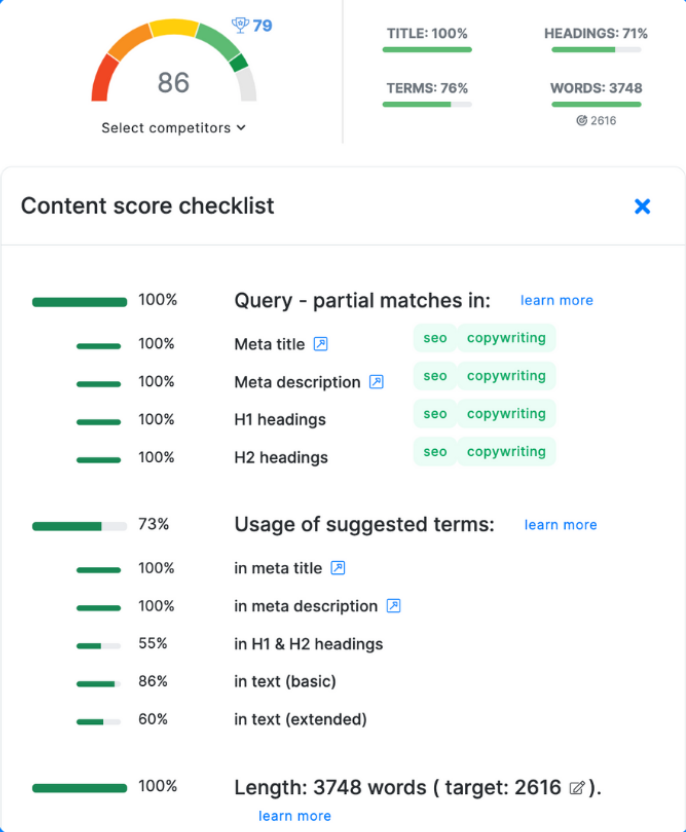
Day 4 rule: if a change makes the page harder to read, it’s not an optimization. It’s clutter.
Day 5: make it publishable (not perfect)
On Day 5, stop thinking like someone “in a trial.” Think like someone shipping a piece of content.
- Tighten the intro so it matches intent in the first 3–5 sentences.
- Cut repeated sections. Merge headings where needed.
- Add internal links (your own site) where they genuinely help navigation.
- Check your page for skim-ability: short paragraphs, clear subheads, real examples.
If your workflow includes publishing to WordPress, this is where you’ll start caring about integrations. You don’t need to set them up today—but you should notice whether copy/paste and formatting drift feel like a problem you want to solve.
Day 6: final check (analysis #3) + “would I repeat this?”
Run your final analysis. Then stop optimizing. The point is not to squeeze a few more points out of a scoring system. The point is to ask one honest question: would I do this again next week?
Pay attention to your friction points:
- Did the SERP scan save time or distract you?
- Did the term suggestions lead to clearer explanations—or awkward stuffing?
- Did the editor make revisions easier—or did it create busywork?
Day 7: publish (or finalize) + decide
Day 7 is decision day. If you can, publish. If you can’t publish for business reasons, finalize the content as if you could. The decision still counts if the workflow is complete.
Then choose your next step:
- If it fit: check NeuronWriter pricing and pick a plan based on your project count and monthly workflow.
- If you publish long-term and hate subscriptions: compare the NeuronWriter lifetime deal.
- If it didn’t fit: keep your notes. That clarity is valuable. It will help you choose the right alternative faster.
How to decide on Day 7 (simple rubric)
This rubric is intentionally boring. Boring is good. It means you’re deciding based on repeatable value, not trial-week excitement.
Pass (buy) if you can say “yes” to most of these
- Coverage improved: your page answers more of the SERP’s obvious questions without feeling bloated.
- Rework decreased: you spent less time guessing what to add and more time editing with purpose.
- Workflow fit: you can imagine using this editor weekly (not occasionally).
- Team clarity: if you work with writers, the checklist makes expectations clearer earlier.
Fail (skip) if you can say “yes” to these
- You felt forced to write for the tool.
- The editor made you add content you wouldn’t stand behind.
- You don’t publish consistently (so it won’t become habit).
Borderline (pause) if this is your situation
- You like the SERP insight but hate the scoring. (You might need a different workflow style.)
- You publish inconsistently. (Fix cadence first; tools won’t create momentum.)
- You need integrations or automation but haven’t tested that part. (Read the dedicated pages before deciding.)
If you want a deeper “fit vs not-fit” view, the next page is: NeuronWriter review. It’s the fastest way to sanity-check whether NeuronWriter is the right kind of tool for your working style.